Cyber Resilience Act
Free SBOM generator for CycloneDX and SPDX
Drawing up a software bill of materials is one of the obligations under the Cyber Resilience Act. The first one takes a few minutes to produce, free of charge, without sign-up and from files the project already contains.
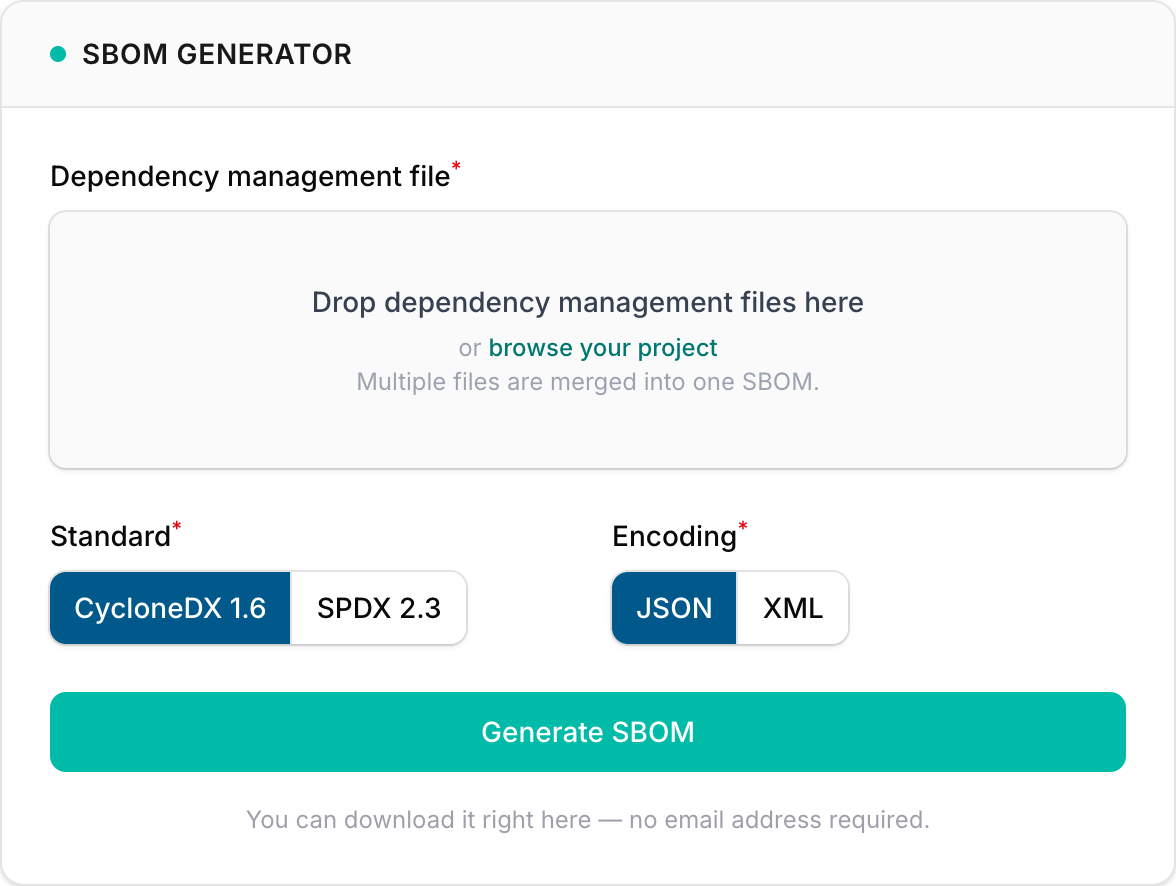
The free SBOM generator from crality turns one or more dependency management files into a software bill of materials (SBOM) in CycloneDX or SPDX, ready to download, with no account and no email address.
The Cyber Resilience Act (CRA) requires manufacturers to document the components of their products, including by means of such a bill of materials. This post explains what the generator does, how its output relates to the requirements of the regulation, where the real work begins, and what the free crality account adds.
What the CRA requires
Under Part II, point (1), of Annex I, manufacturers must identify and document vulnerabilities and components contained in their products, “including by drawing up a software bill of materials in a commonly used and machine-readable format covering at the very least the top-level dependencies of the products”. Article 3(39) defines the software bill of materials as a formal record containing details and supply chain relationships of components included in the software elements of a product. The regulation names no particular format. Under Article 13(24) the Commission may specify the format and elements of the SBOM by implementing acts, taking into account European or international standards and best practices. The two formats in widest use are CycloneDX and SPDX.
The SBOM is part of the technical documentation. Point 2(b) of Annex VII includes it in the information on the vulnerability handling processes. Under point 8 of the same annex it must, where applicable, be provided to a market surveillance authority further to a reasoned request, if the authority needs it to check compliance with the essential cybersecurity requirements. Manufacturers do not have to make it public, as recital 77 makes clear. Under point 9 of Annex II, manufacturers that make it available to users state in the user information where it can be accessed.
These requirements apply from 11 December 2027 under Article 71(2). Products placed on the market before then are only covered if they undergo a substantial modification from that date on (Article 69(2)). Even so, there is a reason to have an SBOM today. Since 11 September 2026 the reporting obligations in Article 14 have applied, and under Article 69(3) they cover the installed base as well. Anyone who has to send an early warning of an actively exploited vulnerability without undue delay, and in any event within 24 hours of becoming aware of it, first needs to know whether the affected component is in their product at all. An SBOM answers that question, provided it is complete and matches the shipped version.
What the generator does
The generator reads files that already exist in the project, usually the package manager’s lock file or a manifest such as pom.xml. It supports 24 file types from 12 ecosystems, from package-lock.json and yarn.lock for Node.js through poetry.lock, Cargo.lock, composer.lock and go.mod to pom.xml for Java, packages.lock.json for .NET and conan.lock for C and C++. For a repository with several languages, all the files can be uploaded at once, and the generator merges them into a single SBOM. The result is a schema-valid document in CycloneDX 1.6 or SPDX 2.3, as JSON or XML, with the names, versions, standardised package URLs (purls) and, where available, licences of the dependencies.
For companies that would rather keep their dependency lists to themselves, what happens to the files matters. They are parsed in memory, the result is returned and the input is discarded. Nothing is written to disk, and nothing is logged beyond a request count. A lock file usually records package names, versions, checksums and download sources, but none of the project’s own code. Manifests such as pom.xml can also contain build configuration and the addresses of internal package repositories, so a quick look before uploading is worthwhile. The generator reads the declared state from the files. It installs nothing and never runs build scripts, and the result is reproducible.
What the SBOM delivers
On format, an SBOM produced this way holds up well, since CycloneDX and SPDX are commonly used, machine-readable formats. It also goes deep. A lock file usually records every resolved package, far more than the top-level dependencies Annex I asks for at a minimum. For a manifest such as pom.xml or a hand-written requirements.txt, however, the result contains only what is listed there. Where there is a choice, the lock file is the better source. Whether that covers every dependency of the product is another question, covered below.
The SBOM is useful straight away. It shows which third-party packages the project uses and, where known, under which licences. It can be matched against vulnerability databases for open-source packages, because the package URLs state each package’s ecosystem, name and, where the file fixes it, version in a standard form. It can serve as a first answer when a customer asks to see an SBOM, provided it comes with a note on what it covers. And it is a starting point for the due diligence for third-party components that Article 13(5) requires of manufacturers.
Where the SBOM stops
An SBOM built from dependency management files describes what a project declares, including the resolved versions in the case of a lock file. The regulation asks about the product, and there is a gap between the two.
- The shipped artefact. What ends up in the product depends on the build, on platform-specific packages, on compiled-in libraries and, for container images, on the base image with its operating system packages. For the technical documentation, an SBOM generated during the build from the finished artefact is therefore the better choice.
- Code outside the package manager. Copied source files, bundled binary libraries and firmware do not appear in any lock file.
- The whole product. A product often consists of several components, such as device software, an app and a backend. Under Article 3(1) its remote data processing solutions are part of it too. Which SBOMs belong to which product is recorded in a product inventory.
- The next version. An SBOM is a snapshot. Dependencies often change with new releases, and under Article 31(2) the technical documentation is to be continuously updated, where appropriate, at least during the support period.
What comes next
The SBOM is not an end in itself. Part II of Annex I mentions vulnerabilities and components in the same breath in point (1), and in point (2) requires vulnerabilities to be addressed and remediated without delay in relation to the risks, including by providing security updates. In practice that means regularly matching the SBOMs of products and versions against newly disclosed vulnerabilities for as long as their support period runs. If one of those vulnerabilities is contained in the product and actively exploited, the reporting obligations of Article 14 apply from the moment the manufacturer becomes aware of it.
The no-sign-up generator does not do this ongoing work, nor is it meant to. It covers the first step, delivers a snapshot and discards the input afterwards. For maintaining the SBOMs and analysing them for vulnerabilities, there is the free crality account.
What the free crality account adds
The account includes its own SBOM generator, which does considerably more than the no-sign-up version. Signing up costs nothing, and there is no limit on the number of products.
- Repository connections. In the account, the generator can be connected to repositories on GitHub and GitLab.
- Manual entries. Copied source files, bundled binary libraries and firmware do not appear in any lock file. In the account, such components can be added to the SBOM by hand.
- SBOMs per product and version. The account keeps SBOMs for each product and version, recording which SBOM belongs to which release.
- Vulnerability analysis. Using the SBOM, crality matches the components against known CVE entries and shows where a vulnerability lies and how it can be fixed.
- Reporting. If a vulnerability in the product is actively exploited, crality helps with the notification under Article 14, covering the recording of the case, the deadlines and the content of the notification.
Unlike the no-sign-up generator, the account stores the SBOMs, so the vulnerability analysis can be run again later.
Practical questions
-
The regulation prescribes neither. What matters is what customers and the manufacturer’s own analysis tools can read. Because the no-sign-up generator produces both formats from the same files, the decision can wait, and both can be delivered if needed. The version of the format that was generated, such as CycloneDX 1.6 or SPDX 2.3, should be recorded, because older tools do not always fully read newer ones. The glossary covers CycloneDX and SPDX in more detail.
-
The regulation contains no duty to hand an SBOM to customers, so it is a business decision. Anyone passing on an SBOM generated from dependency management files should make clear what it represents: the declared dependencies of a project at a given point in time, not the shipped artefact. It also helps to state the product version it refers to and the date it was generated. That way the customer knows what they are holding.
-
The no-sign-up generator does not. It produces the SBOM without assessing it. For matching against vulnerability databases for open-source packages, the package URLs (purls) are the key, while databases such as the NVD work with their own CPE identifiers. A match does not automatically mean the product is affected. Only an assessment shows whether the vulnerable code is reachable in the product at all, and its result can be recorded as a VEX statement. Matching the SBOM against CVE entries is handled by the vulnerability analysis in the free crality account.
-
For an SBOM as a snapshot, the no-sign-up generator is enough, for instance to get a first overview of a project’s dependencies or to answer a customer request. Once a product is on the market, more comes into play: SBOMs per version, components outside the package manager, regular matching against newly disclosed vulnerabilities and, where necessary, notifications under Article 14. The crality account helps with all of this, and it is free as well. The account stores the SBOMs, whereas the no-sign-up generator discards the uploaded files once they have been processed.
The bottom line
The no-sign-up generator covers the first step, a schema-valid SBOM in a common format. The CRA’s obligations reach further, to an SBOM of the shipped product, to keeping it up to date where needed, and to handling vulnerabilities throughout the support period. The free crality account helps with maintaining SBOMs and finding vulnerabilities: it keeps SBOMs for each product and version, accepts manual entries and matches the components against known vulnerabilities. A first SBOM made today at least shows which dependencies the project declares, and it is the basis for everything that follows.
The posts in this blog are for orientation and do not constitute legal advice. The wording of Regulation (EU) 2024/2847 prevails.